


How to Build an LMS: A Practical Guide to Learning Management System Development
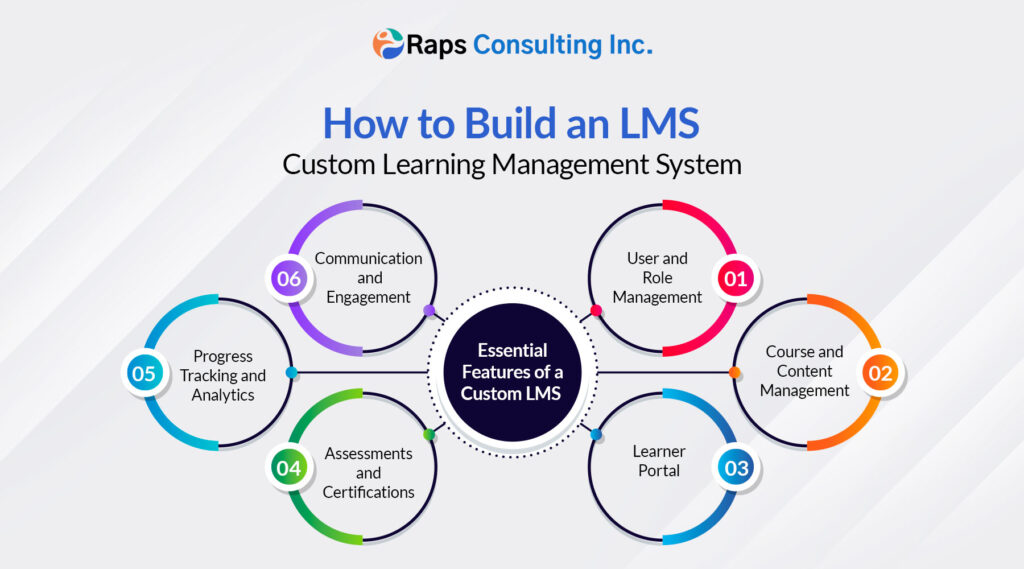
Table of Contents
- What Is a Learning Management System?
- Should You Build a Custom LMS or Use an Existing Platform?
- Essential Features of a Custom LMS
- How Can AI Be Used in an LMS?
- What Technology Is Used to Build an LMS?
- LMS Integrations to Plan Before Development
- How Much Does LMS Development Cost?
- How Long Does It Take to Build an LMS?
- Frequently Asked Questions About LMS Development
When people search for how to build an LMS, they are rarely looking for a list of features alone. They want to know whether they need custom software, what the platform should include, how development works, how long it may take, and what affects the cost.
A learning management system (LMS) is the software behind online courses, employee training, student learning, assessments, certifications, and progress reporting. Building one successfully requires more than uploading videos and adding quizzes. The platform must work for learners, instructors, administrators, and the other systems your organization already uses.
This guide explains the main decisions involved in learning management system development, from choosing between an existing platform and a custom LMS to planning features, integrations, security, AI, cost, and launch.
What Is a Learning Management System?
A learning management system is a digital platform used to create, deliver, manage, and measure education or training.
Depending on the organization, an LMS may be used to:
- Deliver school or university courses
- Onboard and train employees
- Manage compliance or safety training
- Sell professional courses and certifications
- Train customers, partners, or franchise teams
- Track skills, competencies, and learning progress
A basic LMS manages users, courses, assessments, and reports. A more advanced system may also provide mobile learning, virtual classrooms, multiple branded portals, e-commerce, integrations, personalized learning paths, or AI-powered tutoring.
Should You Build a Custom LMS or Use an Existing Platform?
Before starting LMS software development, decide whether your requirements justify a custom build.
Use an existing LMS when:
- Your training process is relatively standard
- You need to launch quickly
- Course delivery, quizzes, certificates, and basic reports meet your needs
- Your organization can work within the platform’s existing workflows
- A subscription and per-user pricing model is acceptable
Platforms such as Moodle, Open edX, TalentLMS, and other commercial products can cover many common learning requirements. Open-source software may remove licensing fees, but hosting, configuration, security, upgrades, and support still require resources.
Consider custom LMS development when:
- Your learning or certification process is unique
- Different clients or departments need separate branded portals
- The LMS must integrate deeply with HR, CRM, ERP, SIS, or other systems
- You need specialized assessments, approvals, or compliance workflows
- Course subscriptions or sales are central to your business model
- You require full control over learner data and product development
- AI must work with proprietary learning content or internal knowledge
The key question is not simply, “Can an existing LMS deliver courses?” It is, “Can it support our complete learning workflow without forcing major operational compromises?”
Essential Features of a Custom LMS
Not every capability belongs in the first release. A useful LMS minimum viable product (MVP) should focus on the tasks learners and administrators must complete from day one.
- User and Role Management
Most systems need separate permissions for learners, instructors, managers, and administrators. Education platforms may also need parent, counselor, or district-level access, while commercial platforms may need client administrators.
Core capabilities can include secure login, single sign-on, bulk enrollment, learner groups, account recovery, and role-based access control.
- Course and Content Management
Instructors need a practical way to create, organize, publish, and update learning content. The LMS may need to support video, audio, documents, presentations, live sessions, assignments, prerequisites, learning paths, scheduled lessons, and multiple languages.
If the organization already owns e-learning content, confirm whether the new platform must support SCORM or xAPI. These standards help compatible systems exchange course packages or learning activity data. LTI, maintained by 1EdTech, supports connections between an LMS and external learning tools. See the official 1EdTech standards for the available interoperability specifications.
- Learner Portal
The learner dashboard should make the next action obvious. It may show enrolled courses, lessons in progress, due dates, assessment results, announcements, certificates, and recommended content.
Mobile usability matters even when a separate app is not planned. A responsive web platform allows learners to continue training across laptops, tablets, and phones.
- Assessments and Certifications
Assessment features may include question banks, randomized quizzes, timed tests, automatic grading, written assignments, rubrics, attempt limits, passing scores, and instructor feedback.
The assessment must match the learning objective. A short quiz can measure recall, but a professional certification may require a project, demonstration, supervisor approval, or instructor review.
- Progress Tracking and Analytics
Administrators usually need reports on enrollment, completion, assessment performance, overdue training, certificate status, and progress by course, department, or learner group.
Good analytics should help someone make a decision. If learners repeatedly leave the same module or miss the same question, the platform should help administrators identify that pattern and improve the course.
- Communication and Engagement
Useful tools may include announcements, email or mobile notifications, discussion forums, calendars, instructor messaging, live-class reminders, badges, and milestones.
Gamification should reinforce learning rather than reward activity that has little educational value.
How Can AI Be Used in an LMS?
An AI-powered LMS should solve a defined learning or administrative problem. Adding a general chatbot without reliable course context is unlikely to create lasting value.
Practical AI applications include:
- AI tutoring: Answering questions and explaining concepts using approved course material
- Personalized learning: Recommending lessons based on a learner’s role, progress, or skill gaps
- Content assistance: Helping instructors draft outlines, summaries, or assessment questions
- Feedback support: Providing preliminary feedback that an instructor can review
- Learning analytics: Identifying unusual engagement patterns or learners who may need assistance
- Administrative support: Answering common platform questions and summarizing course feedback
AI output can be incomplete or incorrect. For grades, certifications, regulated training, or other high-impact decisions, the LMS should maintain human review, source visibility, auditability, and a clear escalation path.
What Technology Is Used to Build an LMS?
The right LMS technology stack depends on user volume, integrations, content types, internal expertise, security requirements, and plans for future growth.
A typical custom architecture may include:
| Platform layer | Common options | What it handles |
| Front end | React, Angular, or Vue | Learner, instructor, and administrator interfaces |
| Back end | .NET, Node.js, Java, or Python | Business rules, APIs, enrollments, assessments, and permissions |
| Database | PostgreSQL, MySQL, or SQL Server | Users, courses, results, and transactional data |
| Cloud infrastructure | Microsoft Azure, AWS, or Google Cloud | Hosting, scaling, storage, monitoring, and backups |
| Mobile delivery | Responsive web, React Native, Flutter, or native apps | Learning access on phones and tablets |
| Analytics | Built-in dashboards or Power BI integration | Operational and learning-performance reporting |
Video content is normally delivered through cloud storage and a content delivery network rather than directly from the LMS application server. Larger platforms may also use a dedicated search service, caching, background processing, and autoscaling.
The best technology stack is not necessarily the newest or most complex. It is the one your team can secure, maintain, integrate, and scale reliably.
LMS Integrations to Plan Before Development
An LMS rarely works alone. Depending on the use case, it may need to connect with:
- Student information systems for enrollment and academic records
- HR or payroll systems for employee onboarding and required training
- CRM platforms for customer or partner education
- ERP platforms for organizational and user data
- Microsoft Teams, Zoom, or other virtual-classroom tools
- Identity providers for single sign-on
- Payment gateways for course purchases or subscriptions
- Email, SMS, and notification services
- Business intelligence platforms
- External content libraries and assessment tools
Define these integrations during discovery. Adding them late can change the data model, security design, project budget, and timeline.
Security
Security controls may include:
- Encryption in transit and at rest
- Multi-factor authentication
- Role-based access
- Secure session and password management
- Audit logs
- Backups and recovery testing
- Vulnerability testing and monitoring
- Separation of client or tenant data
Privacy
The organization should define what learner information is collected, why it is required, who can access it, where it is stored, how long it is retained, and which third parties process it. Applicable requirements will vary by audience, industry, and location, so legal and compliance teams should review the specific use case.
How Much Does LMS Development Cost?
The cost to build an LMS varies widely because a focused training portal and an enterprise, multi-tenant learning platform are fundamentally different products.
Directional market estimates commonly place a focused custom LMS in the tens of thousands of dollars, while platforms with mobile applications, multiple portals, advanced integrations, analytics, and AI can reach several hundred thousand dollars. These figures should be treated as planning context—not as a project quote.
The largest cost factors are:
- Number of user roles and workflows
- Web-only versus web and mobile applications
- Course-authoring and assessment complexity
- Number and quality of system integrations
- Data and content migration
- E-commerce or subscription requirements
- AI capabilities and knowledge preparation
The most reliable way to estimate an LMS is to define the first successful release, review integration readiness, and complete a short discovery phase before fixing the budget.
How Long Does It Take to Build an LMS?
A focused LMS MVP commonly requires a few months for discovery, design, development, testing, and pilot launch. A complex platform with mobile apps, multiple portals, AI, data migration, or enterprise integrations can take substantially longer and is usually safer to deliver in phases.
Timeline depends on more than the number of features. Slow access to existing systems, unclear approval workflows, delayed content, and limited stakeholder availability can extend implementation even when development is progressing normally.
Frequently Asked Questions About LMS Development
What are the essential features of an LMS?
Most LMS platforms need user and role management, course delivery, assessments, progress tracking, reporting, notifications, and administrator controls. The final feature set depends on whether the platform serves schools, employees, customers, or paying course subscribers.
Is it better to build or buy an LMS?
Buying or configuring an existing platform is usually faster when requirements are standard. Custom development becomes more suitable when the organization needs unique workflows, deep integrations, multiple branded portals, specialized assessments, or greater control over its product and data.
What is the difference between an LMS and a student portal?
An LMS manages learning content, assessments, and progress. A student portal may provide broader access to schedules, records, services, forms, communication, or payments. In a custom education platform, the LMS can be one connected part of the larger student portal.
Does an LMS need SCORM or xAPI?
Not every LMS requires them. They become important when an organization needs to import compatible course packages, reuse content across platforms, or capture learning activity beyond the LMS. Confirm the existing content and reporting requirements before including either standard.
Can AI be added to an existing LMS?
Yes. AI tutoring, search, recommendations, content assistance, and analytics can sometimes be integrated into an existing LMS. Feasibility depends on the platform’s APIs, data access, content structure, privacy requirements, and the amount of customization required.
Build the LMS Around the Learning Experience
Successful custom LMS development begins with the people and process the platform must support. Define the learning outcome, understand each user role, identify essential integrations, and build the first release around measurable needs. Technology and AI should support that experience—not make it more complicated.
RAPS Consulting helps organizations design, develop, integrate, and modernize digital learning solutions, including learning management systems, student and administrator portals, assessment platforms, analytics, cloud infrastructure, and responsibly governed AI capabilities.