


8 Signs You Need an HRMS (and What to Do About It)
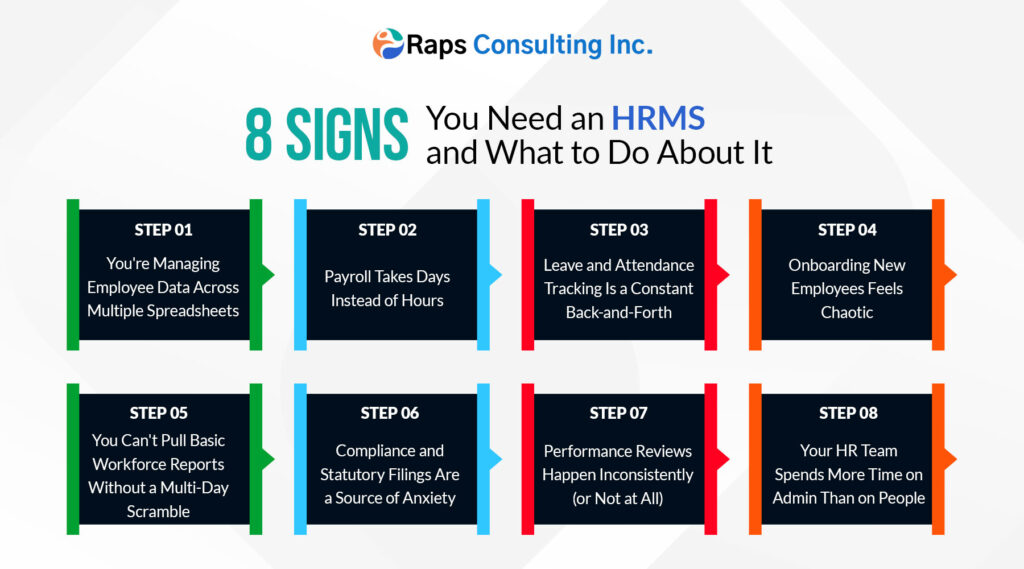
Table of Contents
- What Is an Human Resource Management System (HRMS)?
- 8 Signs You Need an HRMS
- Why Manual HR Processes is Slow?
- HRMS vs. HRIS vs. HCM: What’s the Difference?
- How to Choose the Right HRMS
- What Can you Expect From RAPS EHRM System!
- What to Avoid while HRMS Adoption
- FAQ’s
What Is an Human Resource Management System (HRMS)?
A Human Resource Management System (HRMS) is software that streamlines core HR functions — employee records, attendance, leave, payroll, performance, and compliance — into one platform instead of scattered spreadsheets, email threads, and paper forms.
A typical HRMS handles:
- Employee data and document management
- Attendance and time tracking
- Leave requests and approvals
- Payroll processing and payslip generation
- Onboarding and offboarding workflows
- Performance reviews and goal tracking
- Compliance and statutory reporting
- Self-service access for employees and managers
The point isn’t just digitizing paperwork — it’s removing the manual, repetitive, error-prone work that keeps HR reactive instead of strategic.
8 Signs You Need an HRMS
1. You’re Managing Employee Data Across Multiple Spreadsheets
If employee records, attendance logs, leave balances, and salary details live in five different spreadsheets maintained by two different people, you’re one typo away from a real problem. Spreadsheets don’t flag conflicts, don’t version-control well, and become unmanageable past a certain headcount — usually well before 50 employees.
The tell: Someone on your team can’t answer “how many people are currently on approved leave” without opening three separate files.
2. Payroll Takes Days Instead of Hours
Manually calculating attendance, overtime, deductions, and tax withholding for even 30–40 employees is time-consuming and error-prone. If your payroll cycle regularly runs late, requires manual cross-checking against attendance sheets, or has produced pay errors that needed correction, that’s a direct financial and trust cost.
The tell: Your payroll person dreads the last week of every month.
3. Leave and Attendance Tracking Is a Constant Back-and-Forth
Employees emailing managers for leave approval, managers forgetting to log it, and HR finding out about absences after the fact is a workflow built for a company half your current size. Manual leave tracking also makes it nearly impossible to spot patterns — like a team consistently understaffed on Fridays — until it’s already a problem.
The tell: Leave balances are frequently “off” and require manual reconciliation.
4. Onboarding New Employees Feels Chaotic
If new hires are still filling out paper forms, IT provisioning happens on an ad hoc request basis, and nobody’s fully sure whether a new employee has completed all their compliance paperwork by day 5, onboarding is costing you both time and a poor first impression on new talent.
The tell: New hires routinely ask “who do I even ask about X” during their first week.
5. You Can’t Pull Basic Workforce Reports Without a Multi-Day Scramble
Need headcount by department, turnover rate for the last quarter, or average time-to-fill for open roles? If producing that report means someone manually compiling data from multiple sources over a day or two, you don’t have visibility into your own workforce — you have raw data and no system to interpret it.
The tell: Leadership asks a workforce question and HR’s honest answer is “give me a few days.”
6. Compliance and Statutory Filings Are a Source of Anxiety
Labor law compliance, tax filings, and statutory reporting requirements don’t pause for your manual processes to catch up. Missed deadlines, incorrect filings, or inconsistent documentation create real legal and financial exposure — and manual tracking makes it much easier for something to slip through.
The tell: Compliance deadlines are tracked in someone’s personal calendar rather than a system with built-in reminders and audit trails.
7. Performance Reviews Happen Inconsistently (or Not at All)
Without a system prompting review cycles, tracking goals, and centralizing feedback, performance management tends to become sporadic — some managers do it well, others skip it entirely, and there’s no consistent record over time. This directly affects promotion decisions, compensation planning, and retention.
The tell: Performance review completion depends entirely on which manager an employee happens to have.
8. Your HR Team Spends More Time on Admin Than on People
This is the compounding sign behind all the others. When HR’s day is consumed by data entry, chasing approvals, and manually generating reports, there’s little time left for the parts of HR that actually require human judgment — culture, retention strategy, resolving employee concerns, and workforce planning.
The tell: Your HR team describes their role primarily as “paperwork” rather than “people.”
Why Manual HR Processes is Slow?
It’s worth naming the real costs, since “we’ll get to it eventually” often persists until the cost becomes undeniable:
- Time cost: Hours per week spent on data entry, reconciliation, and manual report generation — time that scales worse as headcount grows, not better.
- Error cost: Payroll mistakes, missed compliance deadlines, and lost leave requests each carry direct financial or legal risk, plus the trust cost of employees noticing.
- Opportunity cost: Strategic HR work (retention, culture, workforce planning) gets consistently deprioritized in favor of keeping the lights on operationally.
- Scaling cost: Every new hire makes manual processes proportionally harder to maintain — the pain compounds rather than staying flat.
HRMS vs. HRIS vs. HCM: What’s the Difference?
These terms get used almost interchangeably in marketing copy, but there are real distinctions worth knowing before you start evaluating vendors:
| Term | Focus | Typical Scope |
| HRIS (Human Resource Information System) | Employee data and records | Core database — employee info, basic reporting |
| HRMS (Human Resource Management System) | HRIS functions + process management | Adds payroll, attendance, leave, onboarding workflows |
| HCM (Human Capital Management) | HRMS functions + strategic workforce management | Adds performance management, succession planning, workforce analytics, sometimes recruiting |
In practice, most modern platforms blend these categories, and vendors often use the terms loosely in their own marketing. Focus less on which label a vendor uses and more on which specific functions you actually need.
How to Choose the Right HRMS
List your actual pain points first, not feature wishlists. Go back to the 8 signs above — which ones apply to you, and how severely?
Map your compliance requirements. Multi-state or multi-country payroll, industry-specific regulations, and union rules all narrow your options significantly.
Check integration needs. Does it need to connect to accounting software, an existing applicant tracking system, or single sign-on?
Test the employee self-service experience, not just the admin dashboard — adoption depends heavily on whether employees find it easy to use for leave requests and payslips.
Get real pricing for your actual headcount, including growth projections — many platforms price per employee, and costs scale faster than expected.
Ask about data migration support. Moving years of employee records and history is often the most underestimated part of switching systems.
Verify support quality, not just sales promises — ask specifically about response times for payroll-related issues, since those are time-sensitive.
What Can you Expect From RAPS EHRM System!
Discovery and configuration — mapping your current workflows (approval chains, pay structures, leave policies) into the new system’s configuration options.
Data migration — moving employee records, historical attendance, and leave balances. This is almost always more time-consuming than initial estimates suggest.
Integration setup — connecting payroll, accounting, and any existing HR tools.
Pilot with a smaller group — running a subset of employees or one department through a full cycle (ideally including one payroll run) before full rollout.
Training — for both HR administrators and employees using self-service features; adoption fails most often here, not in the software itself.
Full rollout and monitoring — tracking adoption, support tickets, and payroll accuracy closely for the first few cycles.
A realistic timeline for a small-to-mid-size company implementing an existing platform is typically 4–12 weeks depending on data complexity and integration needs; custom-built systems take considerably longer.
What to Avoid while HRMS Adoption
Choosing a platform based on features rather than actual pain points
Underestimating data migration time and complexity
Skipping employee training and assuming self-service is intuitive by default
Not running a parallel payroll cycle before fully switching over
Ignoring integration needs until after the platform is already selected
Treating implementation as a one-time project instead of an ongoing process
Not assigning a clear internal owner for the rollout
FAQ’s
How many employees before you need an HRMS?
There’s no fixed number, but most companies feel real friction somewhere between 20–50 employees, especially once attendance, leave, and payroll admin start consuming multiple hours a week. Companies with multiple locations, remote teams, or complex compliance needs often need one earlier.
What’s the difference between an HRMS and just using payroll software?
Payroll software typically handles pay calculation and disbursement only. An HRMS includes payroll as one component alongside attendance, leave management, onboarding, performance tracking, and compliance — giving you one system instead of several disconnected tools.
How much does an HRMS cost?
Small-business, all-in-one platforms (Gusto, Zoho People, BambooHR) commonly run in the range of a few dollars to $15–20 per employee per month. Mid-market and enterprise platforms (Rippling, Workday, ADP) typically involve custom pricing based on headcount, modules, and implementation support, often running significantly higher per employee at scale.
Can a small business build a custom HRMS instead of buying one?
It’s possible but rarely cost-effective for small businesses — existing platforms already solve standard HR needs well. Custom development tends to make sense only when you have unique workflows or integration needs that off-the-shelf platforms genuinely can’t accommodate.
How long does HRMS implementation take?
For an existing platform at a small-to-mid-size company, 4–12 weeks is a reasonable range depending on data migration complexity and integrations. Enterprise-scale rollouts or custom builds typically take several months or longer.
What’s the biggest reason HRMS implementations fail?
Poor change management — specifically, insufficient employee training and skipping a parallel payroll run before fully cutting over. The software itself is rarely the main point of failure; adoption and process transition usually are.